· By the MobiPOS team at HixCode
Free Inventory Software for Mobile & Electronics Shops: What You Need
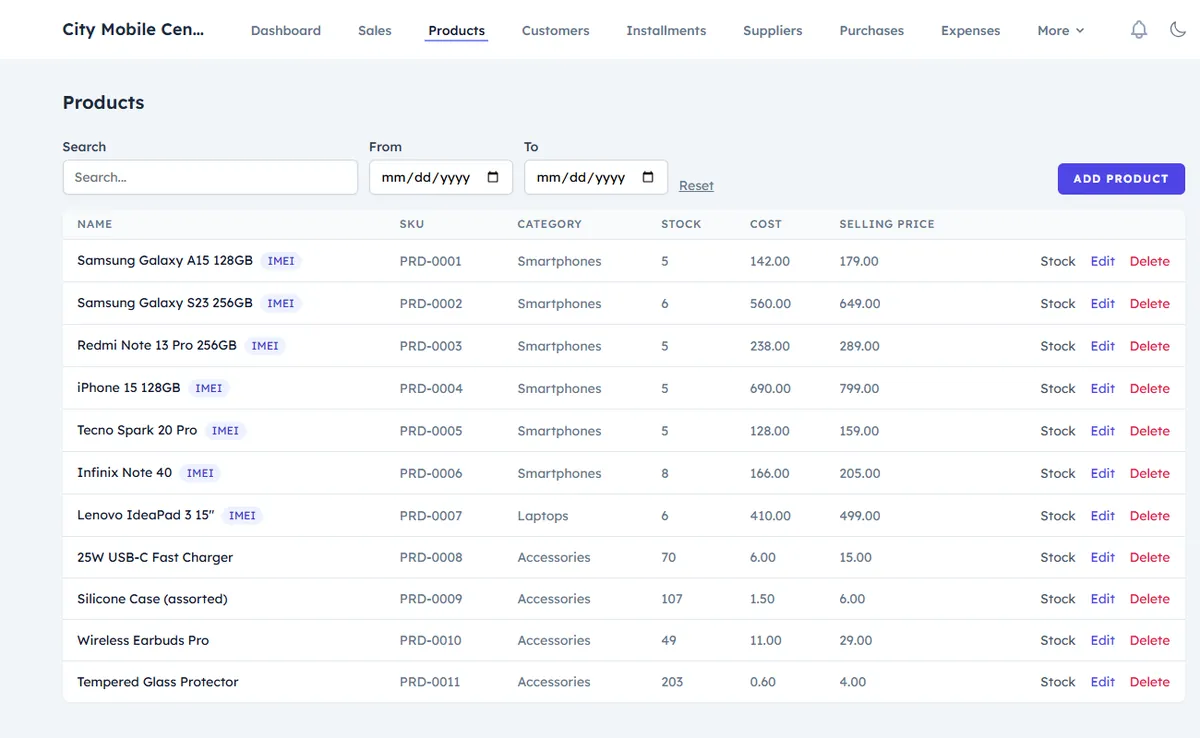
A phone or electronics shop has an inventory problem most retail software wasn't built for: some stock is counted (chargers, cases, cables) while the most valuable stock is unique — every phone and laptop has its own IMEI or serial number. Generic inventory tools often handle only the first kind. This checklist explains what inventory software for a mobile or electronics shop actually needs, and how to get it without a monthly bill.
Serialized vs non-serialized stock
- Serialized stock — phones, laptops, tablets, TVs — is tracked unit by unit. You need to know which exact unit (by IMEI or serial) you bought, from whom, at what cost, and which customer it was sold to.
- Non-serialized stock — accessories, screen protectors, cables — is tracked by quantity with a low-stock alert.
Your software should handle both in the same product list and the same checkout. If you have to keep IMEIs in a separate spreadsheet, mistakes are only a matter of time.
The inventory checklist
- IMEI or serial captured at purchase. Enter or scan each unit's IMEI when it arrives from the supplier, not when it's sold.
- Sell the exact unit. At checkout, pick or scan the specific IMEI, so the invoice, warranty and stock all point to the same phone.
- Supplier purchases and costs. Record purchases from suppliers with the cost price, so profit per sale is calculated automatically.
- Low-stock alerts for accessories and fast-moving models.
- Returns that restore stock correctly — a returned phone should go back into stock under its own IMEI.
- Used devices as their own stock, with purchase cost and condition, so second-hand profit is visible. See the used phone buying checklist.
- Multiple branches, with stock held per branch and transfers between them that keep each IMEI's location accurate.
- Staff permissions, so cashiers can sell without seeing purchase prices or deleting stock.
- Reports: current stock and low-stock items, top-selling products, how long used devices have been in stock, and profit by period.
- Exports to Excel or PDF for your accountant.
How to switch from a spreadsheet or paper
- Add your products first: brand, model, cost and selling price, and whether each is IMEI-tracked.
- Do one stock count and enter what's actually on the shelf — for phones, every IMEI.
- From that day, record every supplier purchase and every sale in the system only.
- After a week, compare the system's stock with a quick shelf count to catch any habits that need fixing.
Free options
Many POS apps are free to start but charge extra for advanced inventory, staff permissions or extra stores — see our comparison of free POS options for phone shops. MobiPOS by HixCode includes everything on the checklist above — IMEI tracking, supplier purchases, returns, used devices, unlimited branches with stock transfers, staff roles and reports — free for lifetime, in every country, in the browser on any phone or computer.
Frequently asked questions
What is serialized inventory?
Serialized inventory tracks each unit individually by a unique number, such as a phone's IMEI or a laptop's serial number, instead of only counting quantities.
Why do phone shops need IMEI tracking in their inventory software?
It shows exactly which phone was bought from which supplier and sold to which customer, which settles warranty claims and disputes and prevents stock errors.
Can one system track phones by IMEI and accessories by quantity?
Yes. Inventory software built for phone shops, such as MobiPOS, keeps IMEI-tracked devices and quantity-tracked accessories in the same product list and checkout.
Is there free inventory software for mobile shops?
Yes. MobiPOS by HixCode is free for lifetime with IMEI tracking, supplier purchases, returns, used devices, unlimited branches with stock transfers, staff roles and reports.